RISK REGISTER SOFTWARE FOR MSPs AND MSSPs
Risk register software that shows clients which risks matter most
Not all risks are equal, and your clients can’t act on a list of forty. vCIOToolbox gives every client a scored risk register, rated by likelihood and impact, so you can show them what matters most in business terms and turn each risk into a decision: fix it, fund it, or formally accept it.
THE PROBLEM
Every client has risks. Few can tell you which ones matter.
Most client risk lives in spreadsheets, old assessment reports, and the vCIO’s head. When it does reach the client, it arrives as a long list with no priority, and a long list with no priority produces no decision.
Business owners act when they can see the size of each risk, what it could cost the business, and what you recommend. That’s the conversation a trusted advisor leads, and it’s hard to lead from a spreadsheet.
HOW IT WORKS
From a list of concerns to a prioritized plan
Record
Start by transferring a gap from a framework assessment, or use the template library of 20+ common risks.
Need something different? Add your own risk.
Set any template as the default risk, and it will apply to all your customers.
Rate
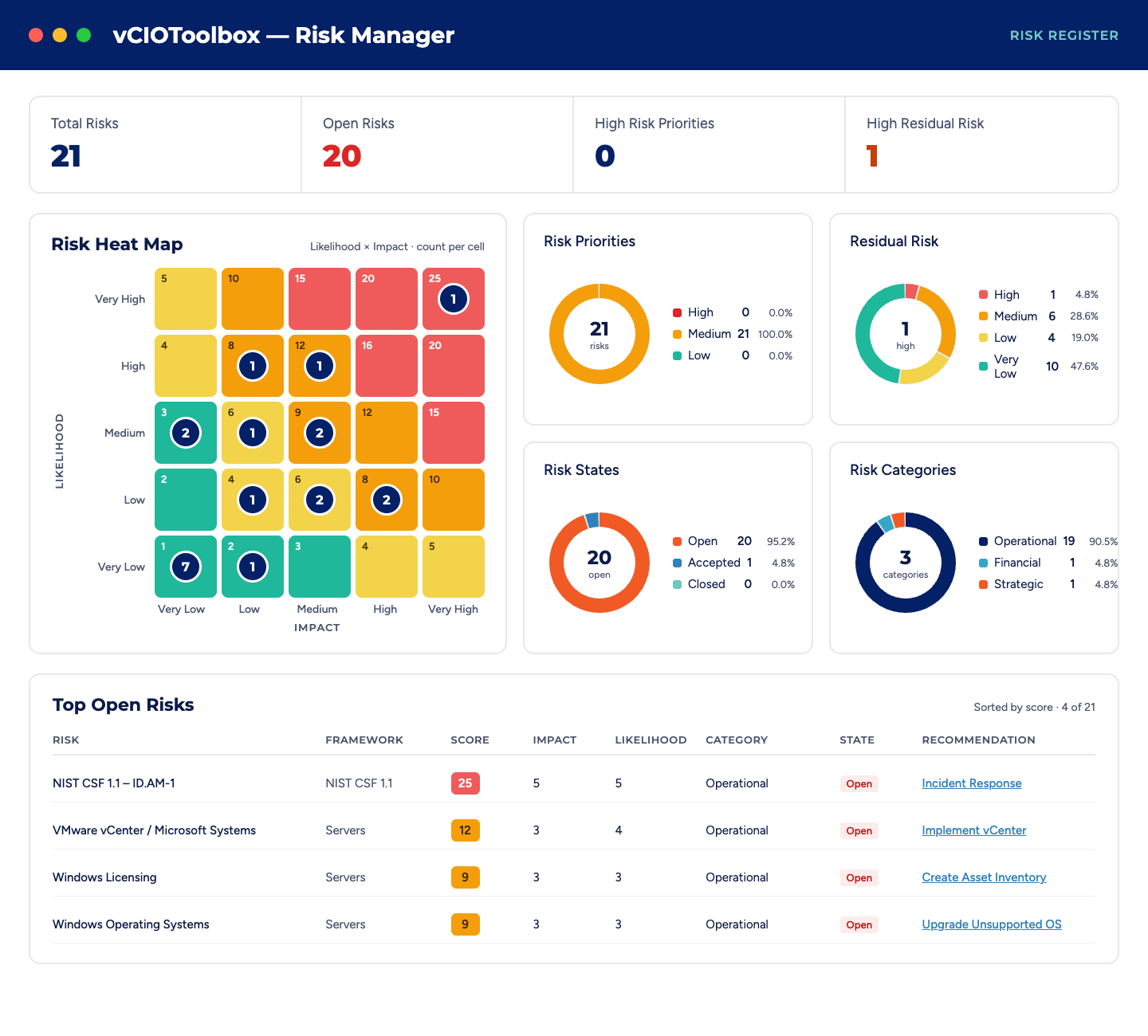
Score each risk on likelihood and impact to generate your risk score and see the full risk picture. Then prioritize what needs attention first.
See the landscape
View each client’s risks in a single dashboard, including a heat map that shows at a glance where the most significant risks sit.
Act
Link each risk to the recommendations and tasks that reduce it, and track it through completion or formal acceptance.
Every risk ends in a decision on the record
Some risks get fixed and some get accepted because the cost of treatment outweighs the impact. Either way, each risk decision belongs to the client and should be documented. vCIOToolbox tracks each risk through remediation or formal acceptance, so there’s a clear record of what you recommended and what the client chose.
That record is what separates an advisor from a vendor: no surprises, no “why didn’t you tell us,” and a natural agenda item for the next review.
Risk that flows into the roadmap, the budget, and the QBR
In vCIOToolbox, the risk register isn’t a separate document. Risks connect to the recommendations, tasks, and compliance controls that address them, recommendations become roadmap items with budgets, and the risk picture shows up in every business review. Your vCIO and vCISO work from the same data.
One standard for risk, across every client
Default risk templates give every client the same baseline, and the dashboard lets you see risk across your whole portfolio, so you know where to spend your team’s time and which clients need a conversation now.
What is a risk register?
A risk register is a structured record of the risks an organization faces, with the likelihood and impact of each, who owns it, and what is being done about it. It lets leaders see which risks matter most, decide how to treat them, and track each one until it is reduced or formally accepted.
What is a cybersecurity risk register?
A cybersecurity risk register applies the risk register to security and IT: threats such as ransomware, data loss, unpatched systems, or vendor failures, each rated by likelihood and business impact. For an MSP, it is the working record of each client’s security risks and the plan to reduce them.
What is risk register software for MSPs?
Risk register software for MSPs lets a vCIO or vCISO keep a separate, scored risk register for every client in one platform instead of a spreadsheet per client. vCIOToolbox adds a template library of 20+ common risks, a dashboard across clients, and links from each risk to the recommendations and tasks that reduce it.
How does vCIOToolbox prioritize risks?
vCIOToolbox rates each risk on likelihood and impact, so the combination shows which risks need attention first. The dashboard displays each client’s full risk picture, and every risk is tracked through remediation or formal acceptance, so nothing sits unresolved without a decision.
What is risk acceptance?
Risk acceptance is a documented decision by the business to live with a risk rather than reduce it, usually because the cost of treatment outweighs the expected impact. Recording acceptance in the risk register shows what the MSP recommended and what the client chose, which keeps the relationship transparent.
How often should a risk register be updated?
A risk register should be reviewed at least at every business review, and updated whenever something significant changes: a new system, an incident, a new assessment, a regulatory requirement, or a change in the business. Many MSPs make the risk review a standing item in each client’s QBR.
Can I standardize risks across all my clients?
Yes. vCIOToolbox includes a risk template library of 20+ common risks, and any template can be set as a default risk that applies across all of your customers. Additionally, risks can be created directly from the framework assessment when a control is found to be misaligned. Every client starts from the same baseline, and your team adjusts likelihood and impact for each one
Can I standardize risks across all my clients?
Yes. vCIOToolbox includes a risk template library of 20+ common risks, and any template can be set as a default risk that applies across all of your customers. Additionally, risks can be created directly from the framework assessment when a control is found to be misaligned. Every client starts from the same baseline, and your team adjusts likelihood and impact for each one
How does vCIOToolbox connect risks to remediation?
In vCIOToolbox, each risk can be linked to the recommendations, tasks, and compliance control answers that address it. Those recommendations flow into the client’s roadmap and budget and into the QBR, so the risk conversation ends with a funded plan instead of a list of concerns.
How does the vCIOToolbox AI assistant help with risk management?
The vCIOToolbox AI assistant pulls current information from every connected tool across your client portfolio in real time and adds business context, so vCIOs and vCISOs can see the why behind risk scores faster and explain them in business terms. Your team reviews all AI-assisted content before any client sees it.