MSP QBR software that turns every review into a decision.
Most QBRs end with a nodding client and no next step. vCIOToolbox gives every vCIO on your team a standardized, repeatable QBR process that connects each finding to the client’s business goals, so reviews end with an approved roadmap, a budget, and a client who trusts you to lead.
The problem isn’t the meeting.
It’s what the meeting is built on.
Too many MSP QBRs are service reports in disguise: ticket counts, uptime, patch status. Clients sit through them, say thanks, and nothing changes.
Behind the scenes, prep eats days of vCIO time, every vCIO runs the meeting differently, and good projects stall because the client was never prepared to say yes.
A QBR earns its place when the client leaves knowing three things: where they stand, what it means for the business, and what to do next.
A simple QBR process in three steps.
Understand the business before you review the technology.
Long-term client relationships start with knowing what the client is chasing and what stands in the way. Too many providers focus so hard on service delivery that the client’s strategy gets lost.
The vCIOToolbox client strategy tool captures each client’s goals, obstacles, and key initiatives, and brings forward risks the client may not know they face. Every recommendation you make later ties back to this plan, which is what makes the conversation strategic instead of technical.
Step
1.
Step
2.
Find the gaps and show what they mean.
Run your IT review from a library of templates mapped to the client’s contract. Identify gaps in infrastructure, security, policy, and process, and score them in a scorecard your client can follow.
Each underperforming standard comes with its business impact, so the client sees the big picture and can decide on next steps based on your recommendations and their own goals.
STEP 3
Build the roadmap and budget so there are no surprises
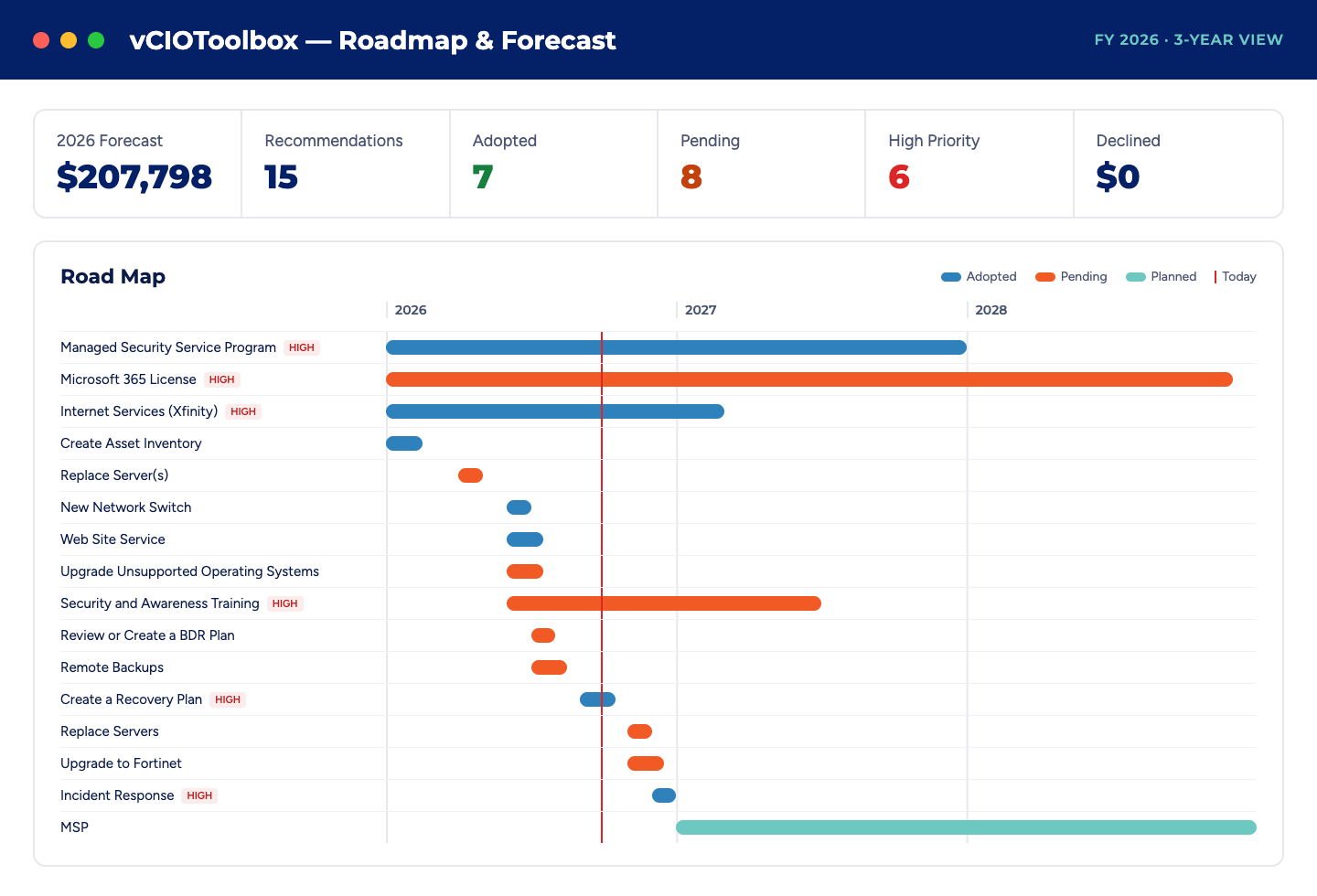
IT projects stall in the sales cycle for one reason: the client wasn’t prepared or wasn’t confident enough to commit. The recommendations engine ties each proposed project to the affected assets and the business goal it serves, and the technology roadmap lays it out with complete budgets.
- Eliminate surprise costs with a clear view of future IT needs.
- Help finance teams plan budgets and understand the priority of each project.
- Show business owners the impact and the problem each project solves.
- Shorten your sales cycles. Approved projects sync to your PSA as opportunities and tickets, and customers report closing 30–60 days faster.
Step
3.
CUSTOMER PORTAL
Give clients a view they can act on.
The vCIOToolbox customer portal gives each client a live, read-only version of their meeting view. When clients can see the trend and the gap between meetings, the next QBR starts with agreement instead of a recap.
- Current dashboard metrics
- Strategic plan progress
- Assessment scorecard
- Technology roadmap
Clients can view but not change anything, and AI-assisted updates are published only after your team reviews them. Run the portal on your own domain.
NEW
Walk into every QBR knowing the Why!
The vCIOToolbox AI assistant pulls current information from every connected tool across your client portfolio, in real time, and adds business context to what it finds. You prepare the review in business speak, not tech speak.
- Prep in less time. Pull the client’s QBR, compliance, and assessment context in seconds instead of assembling it by hand.
- Explain the why. Understand the cause and business impact behind risk scores and assessment results before you walk in.
- Keep momentum between reviews. Have current information ready for weekly and monthly touchpoints, and schedule updates to share with clients.
- Move from findings to initiatives faster. Turn what you find into recommendations and roadmap items.
It works alongside our assessment automation, which customers report cuts TBR prep time by up to 80%.
vCIO ACCELERATOR PROGRAM
Launch your QBR program faster with RampCamp
The hardest part of a formal vCIO program is getting started. RampCamp is a 10-session launch program that gets your QBR process live and producing results
In this program, we:
- Define what success looks like for your MSP.
- Customize the platform to your process and team.
- Train on the PowerQBR process and running meetings that deliver win-win outcomes.
- Coach on report development, meeting tactics, and execution.
- Hold your team accountable through rollout.
Interested in getting to market quickly? Click for more information.
Everything your vCIOs need to run business reviews.
Business Insights
Collaborate with your clients to build your strategic plan.
Template Library
Pre-built IT review templates make assessments easy.
Global Calendaring
Schedule your meetings in advance and track status of each event.
Client Strategy
Formalize the strategic plan and align projects to key iniatives and goals.
Integrated Survey System
Easily conduct custom surveys or poll your clients for CSAT or NPS
Technology Roadmap
Lay out your action plan showing projects with full and complete budgets.
Recommendations Engine
Industry standard recommendations at your fingertips
Report Designer
Build custom reports in your brand using our data elements to create amazing documents.
Asset Lifecycle Management
Automate warranty and refresh cycles easily and quickly.
Dashboard
Visibility through key metrics for your clients, vCIO's, and Enterprise.
YOUR QUESTIONS ANSWERED
Frequently Asked Questions (FAQs)
What is a QBR for an MSP?
A QBR (quarterly business review) is a recurring strategic meeting where an MSP reviews a client’s technology, security, and progress against business goals, then agrees on next steps, projects, and budget. Many MSPs call it a TBR (technology business review). Run well, it is where the MSP acts as a strategic advisor rather than a service vendor.
What should an MSP QBR include?
An effective MSP QBR covers the client’s business goals and initiatives, findings from an IT review with a scorecard, the business impact of each gap, prioritized recommendations, a technology roadmap with budget, and agreed next steps with owners and dates.
Service metrics such as ticket counts belong in an appendix, not at the center of the meeting.
What does vCIOToolbox MSP QBR software do?
vCIOToolbox MSP QBR software gives vCIOs a standardized, repeatable business review process: client strategy capture, IT review templates mapped to each client’s contract, a recommendations engine tied to business goals and affected assets, technology roadmaps with budgets, branded reports, and a read-only client portal. Approved projects sync to your PSA as opportunities and tickets.
How much QBR prep time does vCIOToolbox save?
The vCIOToolbox AI assistant pulls current information from every connected tool across your client portfolio in real time and adds business context to findings, so vCIOs can prepare reviews faster and explain the why behind risk and assessment results.
It also supports weekly and monthly touchpoints between QBRs. Your team reviews all AI-assisted content before any client sees it.
How does the vCIOToolbox AI assistant help with QBRs?
The vCIOToolbox AI assistant pulls current information from every connected tool across your client portfolio in real time and adds business context to findings, so vCIOs can prepare reviews faster and explain the why behind risk and assessment results.
It also supports weekly and monthly touchpoints between QBRs. Your team reviews all AI-assisted content before any client sees it.
How do we get started with vCIOToolbox for QBRs?
You can start a 15-day free trial or request a demo. MSPs that want help launching a formal QBR program can join RampCamp, a 10-session launch program that customizes the platform to your process, trains your team on the PowerQBR method, and holds the team accountable through rollout